
Fecha:
noviembre 25, 2026
 Блог
Mobile browsing can make a slot easy to reach, but not necessarily easy to understand. Small screens, changing layouts and operator-specific account tools can leave important information hidden…
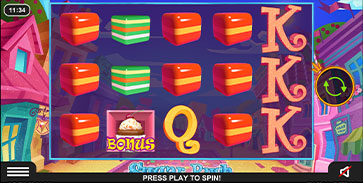
Mobile browsing can make a slot easy to reach, but not necessarily easy to understand. Small screens, changing layouts and operator-specific account tools can leave important information hidden behind menus. For readers comparing sugarush-nz with other online slot platforms, the practical question is less about having a separate app and more about whether the browser experience presents the game rules, settings and account information clearly. A sensible mobile check should cover display, controls, connection demands and the difference between the game itself and the website hosting it.
Start with the browser, not an assumed mobile app
The available information supports browser-based mobile access rather than a dedicated app for the slot. It can be supplied through a compatible casino website on Android and iOS devices, while any native app would belong to the casino operator rather than the game developer. That distinction matters because an app listed by an operator may have its own installation requirements, updates and account features. It should not automatically be treated as an official game-specific application.
Before spending time adjusting an account or downloading software, open the relevant casino website in the device’s normal browser. Check whether the game loads without forcing a separate application, whether the page remains usable after rotating the phone and whether the information or paytable button is visible. If the operator directs users to an app, review the app’s publisher and stated functions rather than assuming that every mobile download offers the same game controls.
A browser test also helps separate technical problems from account problems. If the page loads but the game will not open, the issue may relate to the operator, device compatibility or jurisdictional settings. If the website itself cannot be reached, the problem is broader than the slot. Avoid relying on unofficial download pages, modified applications or browser extensions that promise faster access. Those additions can create security and privacy risks without improving the game’s underlying performance.
Use landscape mode when the grid feels cramped

The game uses a seven-by-seven grid, so a portrait phone screen can make symbols and controls feel compressed. Landscape orientation is generally the more practical starting point because it provides extra horizontal space for the play area and reduces the need to scroll around the display. It will not change the game mathematics, but it can make the grid easier to inspect and reduce accidental taps on nearby controls.
Once the game is open, look for a stable view of the full grid before adjusting the stake or starting a spin. Browser zoom should normally remain at its default setting, since enlarging the page may cut off buttons or force repeated scrolling. If the game appears unusually small, check the phone’s display settings and the browser’s full-screen option, if supplied by the operator. These are presentation changes only; they do not alter the stake, RTP or outcome of a spin.
Touch controls deserve a brief test before real-money play. Identify the spin button, bet controls, sound setting and information menu, then check whether Quick Spin or Autoplay is enabled or disabled. Features such as Autoplay, speed settings and Quick Spin may vary by platform or jurisdiction, so their presence on one device does not prove they will appear everywhere. If the display shifts during rotation, close and reopen the game rather than repeatedly tapping uncertain controls.
Check what the small-screen paytable actually tells you
Mobile convenience should not come at the expense of basic information. The game’s paytable or information screen is the useful reference point for the active RTP configuration and the rules. Commonly listed RTP figures include 96.50%, 95.50% and 94.50%, meaning the figure shown by the particular casino matters more than a general description found elsewhere. RTP is a long-term theoretical measurement, not a forecast for an individual session.
The paytable should also explain the cluster system. Wins require groups of at least five matching symbols connected horizontally or vertically, rather than conventional paylines. Winning symbols disappear and new ones fall into the empty spaces, allowing further clusters during the same spin. There is no wild substitute symbol, and the grid’s candy symbols should not be confused with a progressive jackpot or a guarantee that a cascade will continue.
Pay attention to the multiplier explanation as well. When a winning symbol disappears, its position can be marked; a later winning symbol landing there during the same tumble may activate a multiplier that can increase from 2x up to 128x. In Free Spins, marked positions and their multipliers remain for the feature. These mechanics can make the screen look busy, especially on a phone, so use the information menu before relying on quick visual assumptions.
Protect the browsing session on shared or public connections
Mobile access often takes place away from home, which introduces practical security concerns. A personal mobile connection is preferable to an open public Wi-Fi network when signing in to an operator account. If public Wi-Fi is unavoidable, avoid saving passwords in a shared browser, confirm that the website address is correct and sign out fully when finished. A screen lock and current device software provide useful protection if the phone is lost.
New Zealand readers can consult Netsafe’s online safety guidance for broader advice about protecting accounts, recognising suspicious messages and handling online risks. That general guidance does not confirm anything about a particular casino or game. It is simply relevant when browsing from a phone, especially if a message or advertisement asks for personal information, an unexpected download or payment details.
Keep the operator’s responsibilities separate from the game’s. The casino hosting the slot handles registration, age checks, identity verification, password recovery, deposits, withdrawals and account controls. The game itself does not provide a separate login or customer-service channel. If a mobile session freezes, first record the time and any visible message, then contact the hosting operator through its stated support route. Do not send identity documents to an unofficial social-media account or an unverified support address.
Compare mobile options by control, clarity and limitations
There are three practical ways a mobile user may encounter the slot: a casino website in a browser, a casino’s native application where one is offered, or a free demonstration mode where available. A browser is usually the simplest option to test because it avoids an installation, but it may provide fewer device-specific conveniences. An app might remember preferences or offer smoother navigation, yet its availability and functions belong to the operator and must be checked separately.
Free demonstration play can help assess whether the grid fits the screen, whether landscape mode is comfortable and whether the controls respond properly. It cannot establish how often wins will occur, confirm the active RTP at a real-money operator or predict results. Similarly, a short session cannot prove or disprove a high-volatility description. Treat demo access as a usability check, not as evidence of likely returns or a substitute for reading the operator’s terms.
A useful comparison can be made with four questions: does the grid remain readable, can the paytable be opened easily, are unwanted features such as Autoplay clearly controlled, and can account support be reached without leaving the mobile page? Also check whether the operator states its requirements for verification, payments and account limits. Those conditions are not fixed by the game and may differ between platforms. If the mobile layout hides important information, a larger screen may be the safer browsing choice.
Frequently asked questions about mobile access
Can the slot be played on an iPhone or Android phone?
It can be supplied on compatible Android and iOS devices through a casino website, according to the available mobile information. Compatibility depends on the hosting operator, browser and device. This does not confirm a dedicated application, so check whether the operator offers an app and which functions it supports before downloading anything.
Why is landscape orientation useful on a phone?
The seven-by-seven grid needs space, and landscape orientation can make symbols, buttons and information controls easier to see. It is a display preference rather than a gameplay feature. If rotation causes the page to become unstable, return to the browser’s normal view, reload the game and check the operator’s mobile guidance.
Does mobile browsing change the RTP or winning chances?
No. Changing from portrait to landscape, using a browser or adjusting sound settings does not alter the game’s mathematical configuration. The active RTP can differ between operator configurations, however, so read the in-game information screen. Short mobile sessions cannot establish expected results, volatility or the likelihood of a particular feature appearing.